What Wordfence’s September 2026 WordPress malware report means for enterprise sites
In September 2026, Wordfence published a technical breakdown of a WordPress malware strain that it had been tracking since June. The malware installs itself as a ‘must-use plugin’, which is a WordPress feature that automatically loads any PHP file placed in the wp-content/mu-plugins directory on every request. Once installed, the malware hides itself from the WordPress admin interface, restores itself if deleted, creates administrator accounts that don’t appear in the standard users list, harvests credentials and API keys, and uses the Ethereum blockchain to receive instructions from its operators. Standard dashboard-level security checks will not detect this, and a site that looks clean in the WordPress admin can still be fully compromised.
What a must-use plugin is
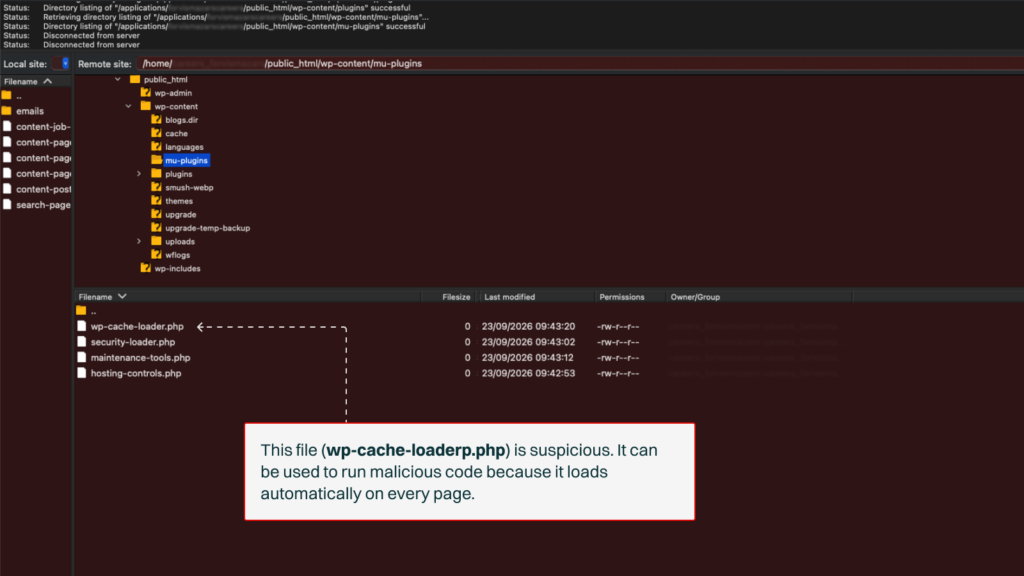
WordPress has a plugin directory called mu-plugins that sits inside wp-content alongside the normal plugins and themes folders. Any PHP file placed in mu-plugins loads automatically on every WordPress request without needing to be activated, does not appear on the standard Plugins screen in the WordPress admin, and cannot be deactivated from the dashboard.
A view of the wp-content/mu-plugins directory on a WordPress site, accessed by FTP. Every file in this folder loads automatically on every request and does not appear on the WordPress Plugins screen. An unfamiliar file placed here would only be visible from this view.
What this specific malware does
Wordfence started tracking this malware in June 2026 after observing samples using more than 4,000 different filenames, including advanced-cache.php, db.php, and files named to match the theme’s own functions.php. The malware uses a custom string substitution scheme that reconstructs sensitive strings (hook names, database keys, file paths) only at runtime, avoiding the standard obfuscation markers such as eval(base64_decode()) that signature-based static scans look for.
A malicious mu-plugin file with a legitimate-looking plugin header. Sensitive strings are only reconstructed at runtime, so they do not appear in the file content itself.
Hidden administrator accounts
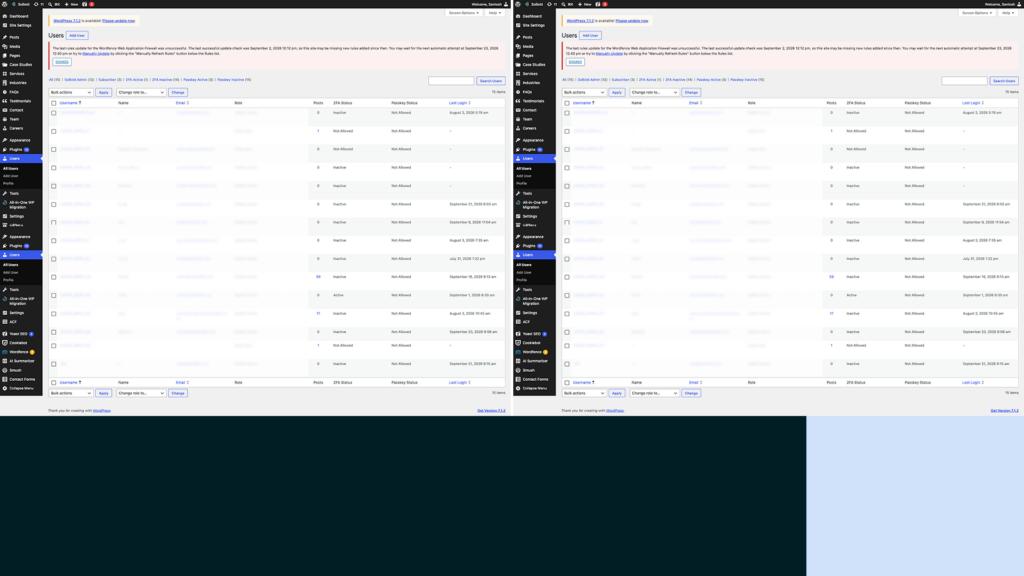
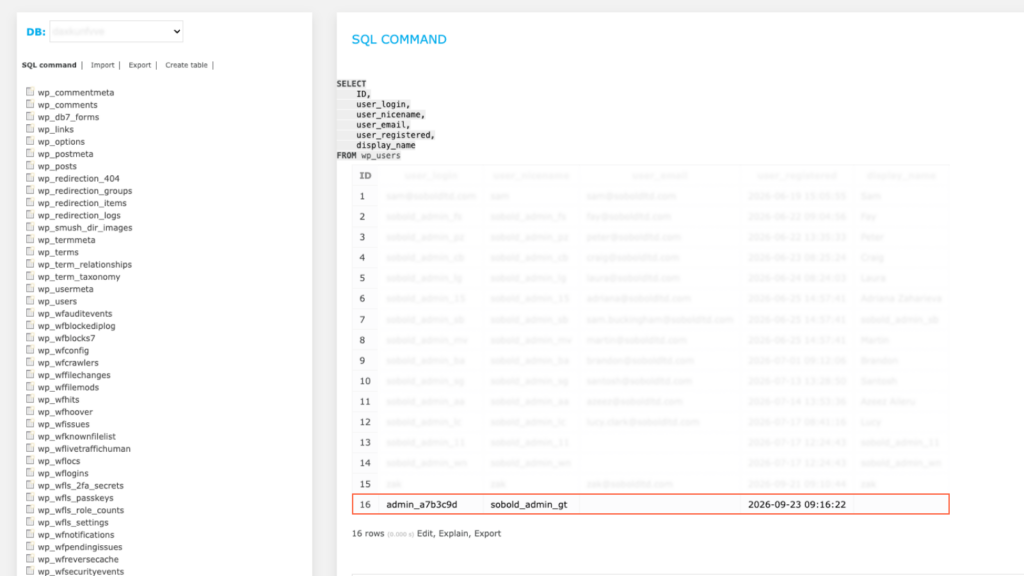
The malware creates administrator accounts with names like admin_, adm_, administrator_ or backup_, each followed by six random characters. If a matching account already exists, the malware resets its password rather than creating a new record. The rogue account is then suppressed from the WordPress dashboard’s user listings, the REST API user endpoints, and the total administrator count shown on the Users screen. It exists in the database, but does not appear in any view the WordPress admin uses.
Two views of the WordPress Users > All Users screen on the same site. On an infected site, the rogue administrator account created by the malware does not appear in this listing, and only a direct query of the wp_users table would show it.
Self-restoration
The malware stores a full copy of its own source code inside the WordPress database and runs an integrity check on every request. If the malicious file has been deleted or truncated, the implant rewrites it from the database copy, backdates the modification timestamp to match the surrounding files, and sets the file permissions to read-only. Deleting the file alone does not remove the infection, because the malware restores it on the next page load with a timestamp that gives no indication it was ever changed.
The blockchain command channel
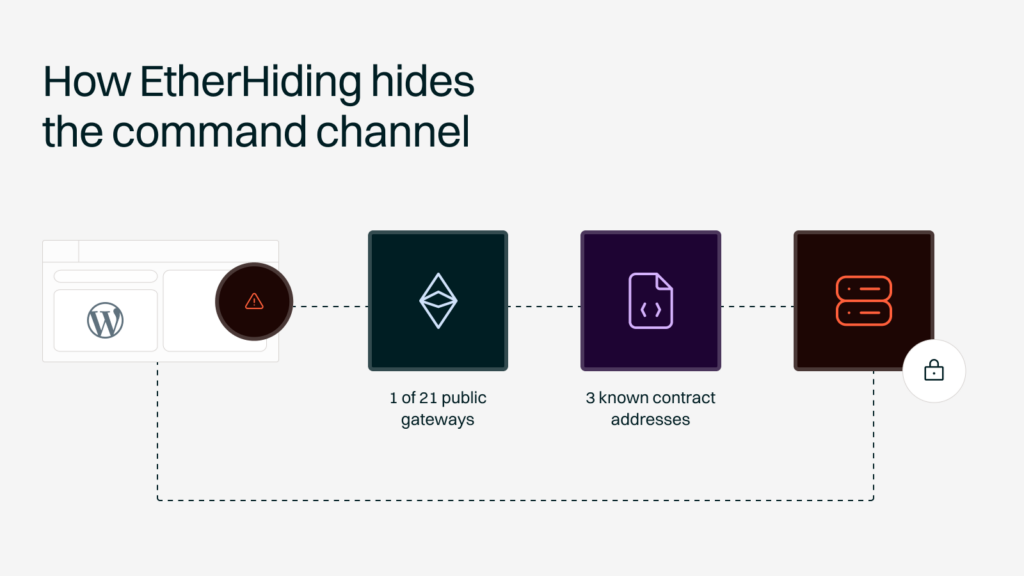
Traditional WordPress malware calls out to a hard-coded domain or IP address for its instructions, which allows defenders to neutralise a campaign by blocking or taking down the command-and-control domain. This malware uses a technique known as EtherHiding, which reads command-and-control information from the Ethereum blockchain. The implant is hard-coded with three Ethereum smart contract addresses and 21 public JSON-RPC endpoints, which are the public gateways used to read blockchain data. On each check-in, it picks a combination at random, sends a standard eth_call request to the chosen endpoint, and receives a response from the smart contract containing an encryption key and a current list of HTTP servers. Once decrypted, the response gives the malware its next set of server addresses to contact.
The EtherHiding command-and-control flow. The compromised site queries a public Ethereum RPC gateway, which returns encrypted data from an attacker-controlled smart contract containing the current list of command servers. Because the smart contract can be updated at any time and the gateway list is redundant, blocking any single server or gateway does not disrupt the channel. Blocking the command-and-control domain, which is the standard defensive response to malware of this type, does not work here. Ethereum's public infrastructure cannot be taken down, and the smart contract is under the attacker's control and can be updated with new server addresses at any time. Blocking one RPC gateway does not stop the malware, because it can request the same data from any of the other 20 in its list.
What it does once it’s inside
Once the implant is in contact with its operators, it can be instructed to perform any of the following:
Harvest credentials: The malware hooks the WordPress authenticate filter to intercept administrator passwords in plain text as legitimate admins log in.
Exfiltrate secrets: It searches the site for wp-config.php and .env file contents, API keys for payment providers (Stripe, Braintree, Authorize.Net), AWS credentials, and WooCommerce order data.
Inject JavaScript: It can inject attacker-controlled JavaScript into the pages served to site visitors, which is the delivery method for Magecart-style card skimming, credential harvesting forms and traffic redirection.
Remove competing security tools: It can delete other security plugins on the site to reduce the chance of detection.
Spread across shared hosting: On shared hosting, it searches for other WordPress installations in adjacent directories and copies itself into each of them, turning a single-site compromise into a multi-site incident. Running each site on dedicated WordPress hosting closes that route, because the server holds no other customers’ WordPress installations to spread into.
Why this matters for enterprise
The Plugins page, the Users screen, Site Health checks and admin-level scans all return a clean result on an infected site. The compromise is only visible by inspecting the file system directly, querying the database outside the WordPress admin, and auditing user accounts at the database level. The payload targets sensitive assets in a regulated business: customer records, payment credentials, admin passwords, API keys to cloud infrastructure, and the JavaScript served to visitors on customer-facing pages. The strain harvests information and reports it back without producing any visible signals: no defacement, no measurable performance degradation, no outbound spam. On a site without file-system and database-level monitoring, it can remain undetected for months.
How to check whether you’re affected
The Wordfence report sets out four indicators for site owners to check.
Inspect the wp-content/mu-plugins directory at the file system level: The dashboard cannot be used to review this, because the malware hides its files from every WordPress admin view. Look for unfamiliar files, particularly ones named advanced-cache.php, db.php or a theme’s functions.php that do not belong there.
Query the WordPress user table directly in the database: The Users screen in the WordPress admin will not show the rogue account. Look for administrator accounts matching the pattern admin_xxxxxx, adm_xxxxxx, administrator_xxxxxx or backup_xxxxxx, where the suffix is six random characters.
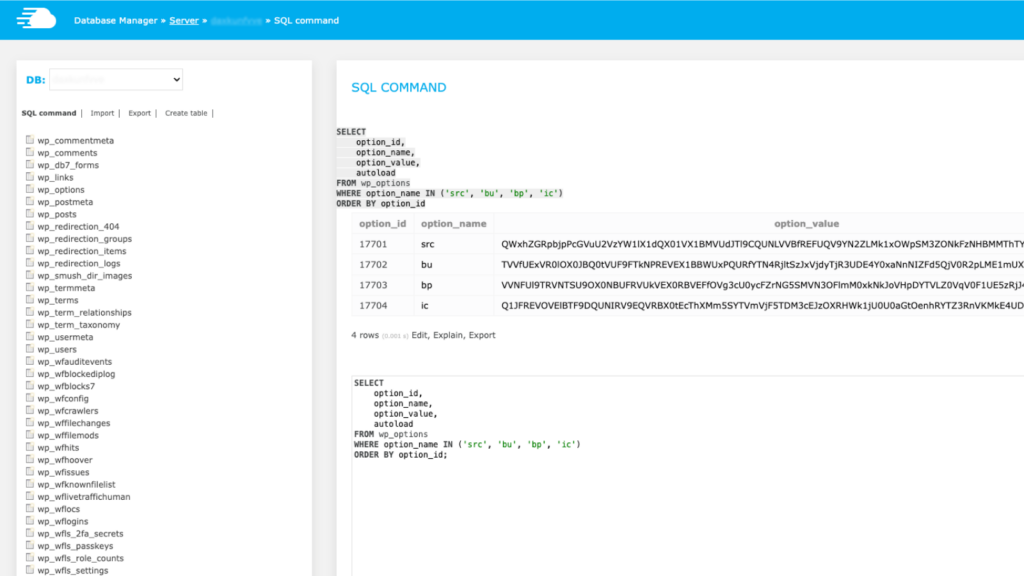
Query the WordPress options table: Look for entries with the keys src, bu, bp and ic, which the malware uses to store its own backup copy and captured credentials.
Review server logs for outbound requests to public Ethereum RPC endpoints: Legitimate WordPress sites do not communicate with blockchain infrastructure, so any such traffic is a strong indicator of compromise.
An example of the wp_options table on an infected site. The keys src, bu, bp and ic hold the malware's backup copy and captured credentials, and only appear when the database is queried directly.
How to remove it, and how not to
Deleting the malicious file on its own does not work, because the self-restoration mechanism rewrites it from the database copy on the next page load. Deleting the database entries as well is still insufficient on shared hosting, because a copy may already sit on another site under the same account and reinfect from there. Wordfence recommends a clean rebuild from verified files and known-good backups over surgical removal, and it is the approach we take at SoBold when treating a suspected compromise. Every credential on the compromised site should also be treated as exposed and rotated: WordPress admin accounts, WooCommerce, and every API key for connected services including payment providers, cloud, email and analytics. For an enterprise WordPress estate, every other site on the same hosting account should be audited at the same time, because a single infection is a reasonable indication that others may be present.
How to prevent it
Most malicious mu-plugin infections start in one of two ways: a compromised admin credential, or an exploited vulnerability in a legitimate plugin that gives the attacker file-write access. Prevention rests on two disciplines:
Close the exposure window:
Proactive patching, on a monthly baseline with same-day patching for anything high or critical, keeps the initial vulnerability window as short as possible. This is the standard we run on our Cyber Shield SLA.
Protect admin credentials:
2FA, SSO where possible, IP allowlisting for admin access, and rate limiting on the login endpoints. Beyond those two disciplines, effective protection also requires server-side file integrity monitoring on the mu-plugins directory and the wider wp-content tree, database-level audits of the user and options tables, and outbound network monitoring that would flag unusual traffic such as blockchain RPC requests.
Whether you’re in financial services, healthcare, energy or another sector, we start every project with a conversation about your requirements. No commitment, just a discussion about your needs.